







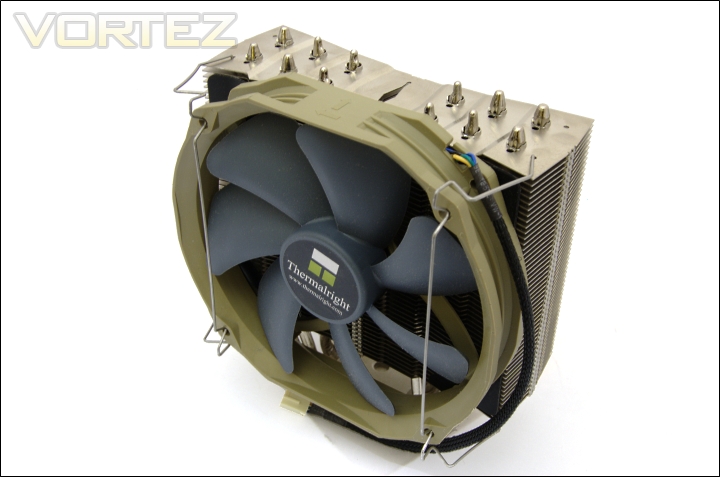
Thermalright are making yet another return with a cooler, this time with a slightly different styling. Let’s see how the Archon fares.
Product on Review : Thermalright Archon
Manufacturer and Sponsor : Thermalright
MSRP : Not mentioned on site
Street Price : £44.36
Thermalright have been on a spree since last year, releasing an assortment of different coolers to meet a wide range of applications and needs. They started last year by releasing the Venomous X after a lengthy dry spell during which their Ultra Extreme reigned supreme as their flagship cooler. The Venomous X was an immediate success coming close to even matching the almighty Noctua NH-D14 but this was not enough for a company were getting cosy as market leaders. Half a year later, Thermalright showcased two new innovations in the form of their dual tower Silver Arrow and the HR-02 for passive operation. Both were evolutions of previous concepts which Thermalright had taken and tuned to accommodate the heat generated by overclocked CPUs. Both proved to be highly efficient in noise and cooling performance, the Silver Arrow more so thanks to its dual radiator design.

But performance came at the price of space and the growing popularity of memory modules with tall heat spreaders meant that consumers had to compromise on their heatsink choice. This is where Thermalright come in with their latest cooler, the Archon. As the name suggests, the cooler is designed to rule over the competition but the question is; how do they aim to achieve this? The Archon is very unique on many levels, unlike other Thermalright heatsinks, it has been designed from the grounds up without previous iterations to inspire them. Its main goal is to deliver the same performance we have become accustomed to from other Thermalright offerings without conflicting against adjacent memory modules regardless of their size. The end result is a narrow heatsink shape compensated by its greater height to create more surface area than the Venomous X.
The concept is reminiscent of Prolimatech’s Armageddon. Thermalright have gone a step further and bundled their TR TY-140 with the heatsink so not only does the cooler promise chart leading performance but it also promises value for money.
A few words from Thermalright
Thermalright is an elite design house that manufactures cooling products for computer components for the best quality and performance your money can buy. In 2002, AMD released its first generation Thunderbird CPU and since then we have been there every step of the way to counter high voltage and high heat with innovative design and highly acclaimed cooling solutions not only for AMD but for Intel as well. One of early well known solutions was the SK-6. With many positive and rave reviews under its belt Thermalright bolted to the top as the heat sink manufacturer mostly preferred by overclockers and enthusiasts around the World. To this day, innovation never left our vocabulary as we keep coming up with leading edge designs staying ahead of the competition.
Although the cooler appears promising, there’s only one way to find out if it lives up to its name. Read on to find out.
Features & Specifications
Features and Specifications
Features
•Armour style heatsink fin array, with mirrored copper base, elevates heatsink’s overall quality.
•Large heatsink fin array provides dissipating area of up to 150x125mm, making complete use of the airflow, with 140mm or 120mm fans.
•With the max width of 55mm, tall memory heat spreaders are avoided.
•Six sintered heat pipe designed, all heat pipes are nickel plated, to slow the oxidation deterioration to the heat pipe, to ensure longer usage and performance of the heatsink for the CPU.
•Multi-platform support. Can be used on Intel Socket 1366/1156/1155/775 and AMD socket AM2/AM3. For Intel sockets, pressure is adjustable (40~70lbs.)
•Includes one Thermalright TY-140 PWM fan, Ultra low noise at 21 dBA at max rpm (50cm testing distance)
•Fan-clips are compatible with both 140mm and 120mm fan.
•Comes bundled with Thermalright Chill Factor III thermal paste.
Specifications
•Cooler dimensions: 155x53x170mm (LxWxH)
•Cooler weight: 806g (excluding mounting bracket and fan)
•Heat pipe: 6mm Sintered Heat pipes x6 units
•Cooler base material: C1100 Pure Copper nickel plated with mirror shine
TR TY-140 Fan Features
•PWM fan provides simple and easy adjustment of fan speed with the latest ETC IC
•Seven Silent Torpedo Blades – “submerges”. Gives most quiet and efficient airflow
•Enhanced Hyper-Flow Bearing (EHFB) – to ensure consistent and stable RPM, prolonged lifetime of usage
•Aerodynamic body – less friction around the edges and give more centred and concentrated flow
•12cm mounting hole – allow installation on the 12cm dimension, so will be compatible with most cooler without having the need to buy extra kit for 14cm fan.
TR TY-140 Fan Specifications
•Fan dimension: Length 160x140x26.5mm (LxHxW)
•Fan weight: 140g
•Fan speed: 900-1300RPM (PWM)
•Fan noise level: 19-21dBA
•Fan Airflow: 56-73CFM
•Armour style heatsink fin array, with mirrored copper base, elevates heatsink’s overall quality.
•Large heatsink fin array provides dissipating area of up to 150x125mm, making complete use of the airflow, with 140mm or 120mm fans.
•With the max width of 55mm, tall memory heat spreaders are avoided.
•Six sintered heat pipe designed, all heat pipes are nickel plated, to slow the oxidation deterioration to the heat pipe, to ensure longer usage and performance of the heatsink for the CPU.
•Multi-platform support. Can be used on Intel Socket 1366/1156/1155/775 and AMD socket AM2/AM3. For Intel sockets, pressure is adjustable (40~70lbs.)
•Includes one Thermalright TY-140 PWM fan, Ultra low noise at 21 dBA at max rpm (50cm testing distance)
•Fan-clips are compatible with both 140mm and 120mm fan.
•Comes bundled with Thermalright Chill Factor III thermal paste.
Specifications
•Cooler dimensions: 155x53x170mm (LxWxH)
•Cooler weight: 806g (excluding mounting bracket and fan)
•Heat pipe: 6mm Sintered Heat pipes x6 units
•Cooler base material: C1100 Pure Copper nickel plated with mirror shine
TR TY-140 Fan Features
•PWM fan provides simple and easy adjustment of fan speed with the latest ETC IC
•Seven Silent Torpedo Blades – “submerges”. Gives most quiet and efficient airflow
•Enhanced Hyper-Flow Bearing (EHFB) – to ensure consistent and stable RPM, prolonged lifetime of usage
•Aerodynamic body – less friction around the edges and give more centred and concentrated flow
•12cm mounting hole – allow installation on the 12cm dimension, so will be compatible with most cooler without having the need to buy extra kit for 14cm fan.
TR TY-140 Fan Specifications
•Fan dimension: Length 160x140x26.5mm (LxHxW)
•Fan weight: 140g
•Fan speed: 900-1300RPM (PWM)
•Fan noise level: 19-21dBA
•Fan Airflow: 56-73CFM
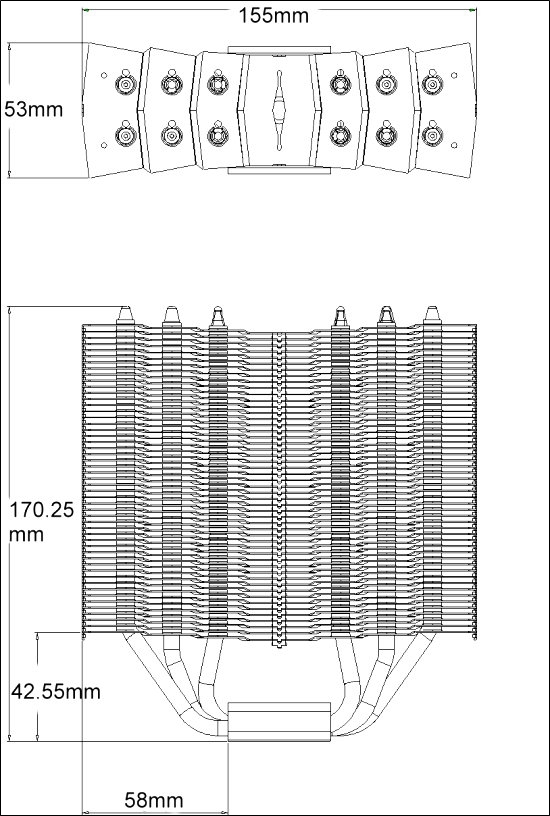
The most immediate observation is the size of the cooler. Typically, heatsinks tend to be 160mm tall at a stretch and case manufacturers take this under consideration when designing their cases. The Archon is designed to be as narrow as possible to accommodate tall memory modules. The result is a tall and thin heatsink, akin to a supermodel compared to the shorter and stumpy standard heatsinks. At 170.25mm, it is 10.25mm taller than the Venomous X. To compensate for the narrower width at 53mm instead of 63mm width of the Venomous X, the Archon is also longer at 155mm. This is 28mm longer than the Venomous X, 25mm longer than the Super Mega and 8mm longer than the Silver Arrow.
The Archon employs the same 6 sintered heat pipes as found on the Venomous X and the HR-02, which are soldered to the nickel plated copper base for optimal thermal conductivity. Thermalright are also accustomed to making their base slightly convex to accommodate the overall finish of a CPU HIS and the Archon is no exception, although this isn’t very noticeable without careful observation. The Archon is very flexible in the fans that it supports, with fan clips that allow both 120mm and 140mm to be mounted without any issues. Furthermore compatibility is ensured on all modern Intel and AMD motherboard sockets. The aluminium fin design takes a very unique approach so let’s have a closer look over the next few pages.
Packaging and Content
The front of the box
Thermalright’s packaging is always very understated and this is no different to the norm. The box is a standard cardboard packaging with a plain brown look and the Thermalright logo printed on the front. There is little other information printed so we can assume that the reason is for cost cutting measures. My only complaint is the lack of a specifications table or feature list for potential buyers, but given that most sales would be online, it is understandable. The box is smaller than the Silver Arrow’s.
Looking inside the box
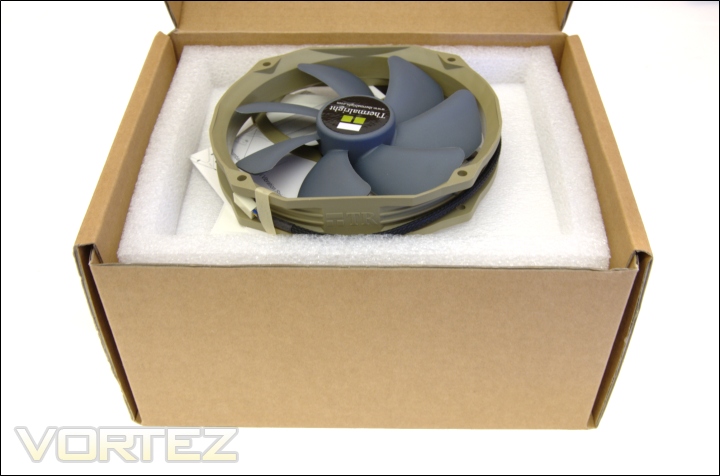
Upon opening the box, we are greeted with a few leaflets detailing the bundled content and installation procedures, and a single Thermalright TY-140 fan. The entire box is lined by foam. Below the fan is a white box retaining the installation kit. A Thermalright sticker has also been included for good measure.
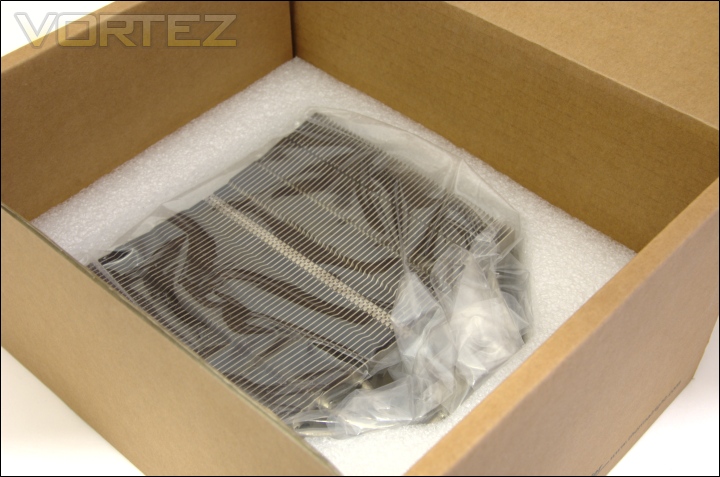
The cooler in the box
Inside, the cooler is neatly wrapped in a plastic bag enclosed thickly by foam for extra security during transit.
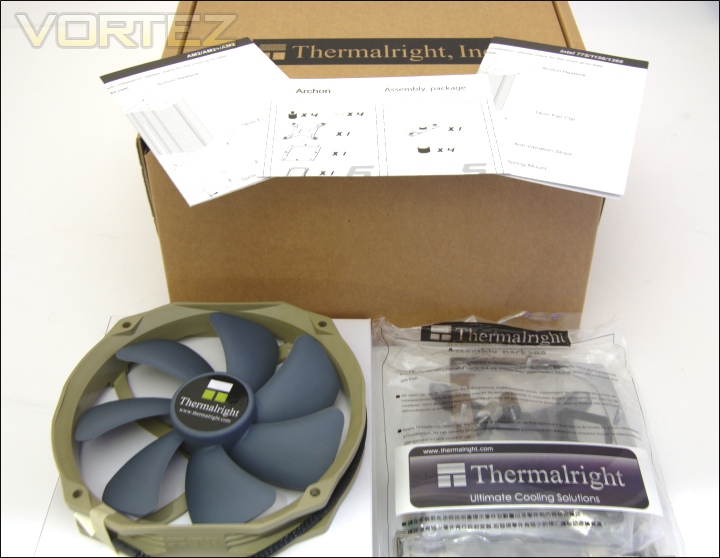
The bundle
Apart from the cooler itself, Thermalright have bundled the installation kit in its own plastic bag, a 140mm TY-140 PWM fan and three leaflets. Two of the leaflets detail installation for AMD and Intel motherboard sockets respectively and the third leaflet lists all the components. Inside the bag, the respective AMD and Intel mounting kits have been packaged separately and labelled appropriately.
The fan is very unique in its design, sporting an interesting military green and blue colour scheme. Unlike the circular shape of the Noctua NF-P14 fan, the TR TY-140 doesn’t adhere to a regular shape. Instead it has a 160x140mm dimension whereby two opposite sides are straight and the other two are semi-circular. The fan fittings are the same as 120mm fans to ensure compatibility with other coolers or cases. Users have to be aware that the actual fan dimensions may restrict installation in some situations. It would have been welcoming to see some brackets for 140mm fan fittings given that the fans have very good specifications. The seven bladed fan uses a propeller design to maximise airflow whilst reducing noise levels. Thanks to PWM functionality, they can operate between 900 and 1300RPM. The braided cable is an excellent finishing touch that adds class to the product.
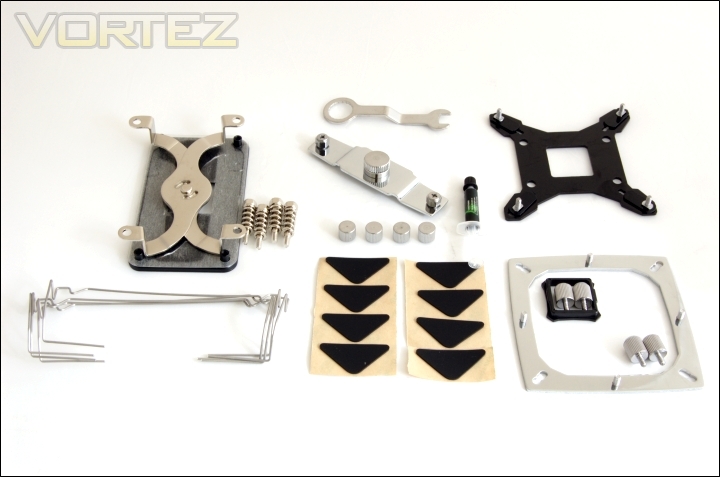
The installation kit
One of the key aspects of the Thermalright Silver Arrow is its compatibility with both Intel and AMD systems. Included in the mounting kit are the:
– multiple support backplate for Intel (Intel)
– AM2 backplate (AMD)
– Insulated washers x4 (Intel)
– anchoring mount (Intel)
– AM2 X bracket (AMD)
– pressure vault mounting plate (Intel)
– screw pillars x4 (Intel)
– thumbscrews x4 (Intel)
– backplate cap for Socket 775 (Intel)
– Spring loaded screws x4 (AMD)
– angled wrench
– fan clips x4
– anti vibration padding x8
– anti vibration strips x4
– Thermalright Chill Factor III Thermal paste
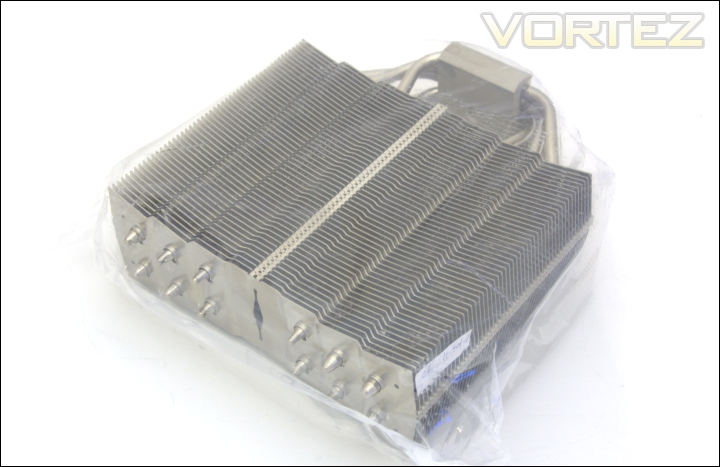
The Archon neatly wrapped up
The final component in the box is the cooler itself nicely wrapped in plastic.
Closer Look
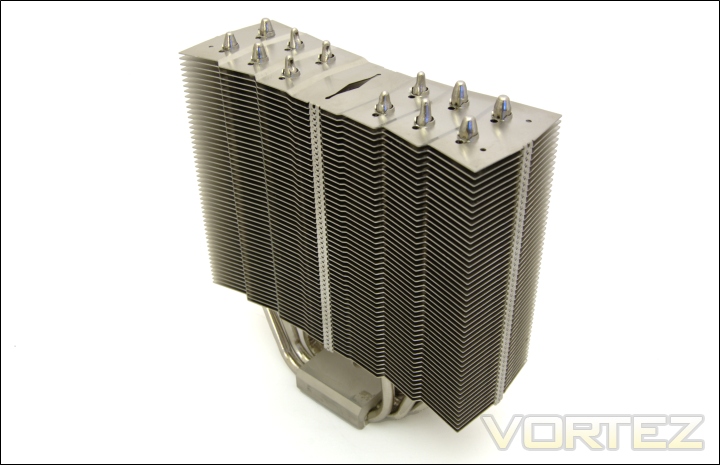
The Archon
The Archon has a very distinctive shape design. It becomes apparent upon removing it from the box that it is unlike any other cooler to come out of Thermalright’s labs. The most striking feature is its dimension. Its thin and narrow design is to allow memory modules of all sizes to be installed in the adjacent slots without any issues. The finish on the cooler is more matte compared to the shiny reflective surface of the Silver Arrow’s. Nonetheless, it is still aesthetically pleasing with a robust look that shouts quality and durability.
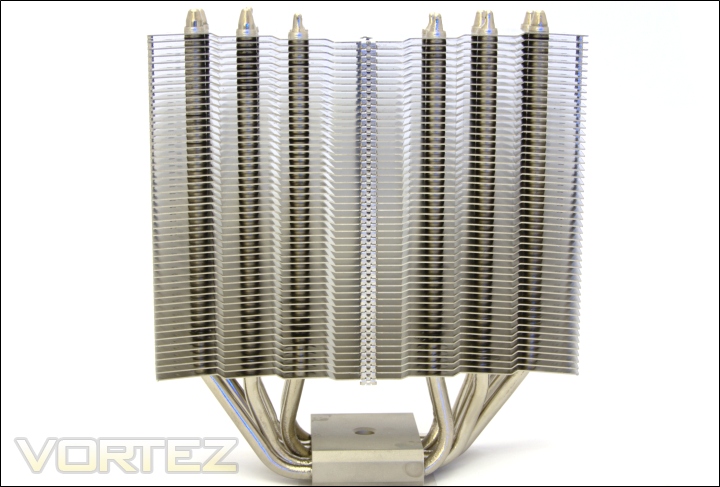
The front face
From the front face we can have a better look at the fin array. The heatsink has a total of 51 aluminium fin across its towering 170mm height. In comparison, the Silver Arrow’s array is denser with 55 fins across its 160mm height. The Archon’s fins are separated by a 2.5mm gaps, similarly to the Prolimatech Super Mega. All the fins are identical and stack up vertically parallel to each other. The shapes of the individual fins have been designed to optimise airflow. They have a ripple like structure that is symmetrical about the centre. The ridges generate more turbulence as air flows through to advect as much heat as possible. The downside of turbulence is noise but the fins have also been designed to minimise this effect. The surface area of each fin is around 7750mm squared, 250 less than the Venomous X, but with a total of 51 fins rather than 48 on the latter, the total surface area favours the Archon. According to Thermalright, the surface area of the Archon is quoted to be 1.6 times that of the Venomous X although we believe that to be less based on the dimensions. We can also see the heat pipes spread out vertically across the heatsink. The length of the Archon means that users will have to make sure it doesn’t overhang chipset heatsinks. The vast frontal area of the heatsink introduces another dilemma. Fans may not be big enough to be able to push air across all the fins meaning the extra surface area is wasted.
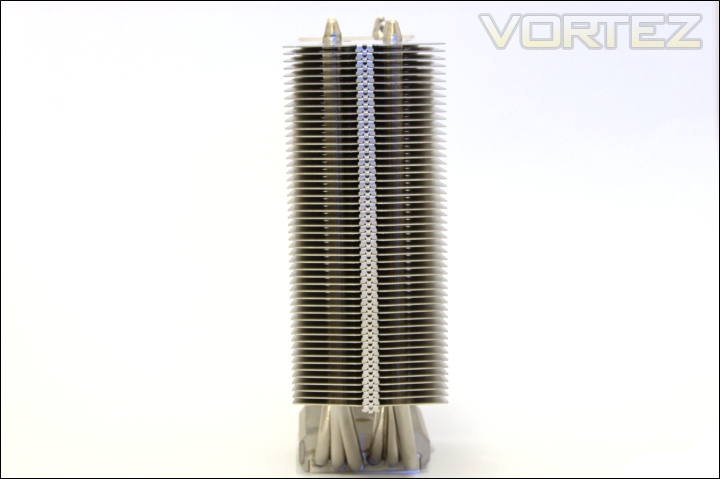
The side profile
From the side profile, the fins appear laterally flat and don’t boast the bent winglet design on Silver Arrow or Venomous X. At only 55mm wide, the Archon is one of the narrowest heatsinks on the market and is barely wider than the base from which the 6 heat pipes protrude from. From this view, we can see two columns of 6 heat pipes rising across both sides of the heatsink for a symmetrical design.
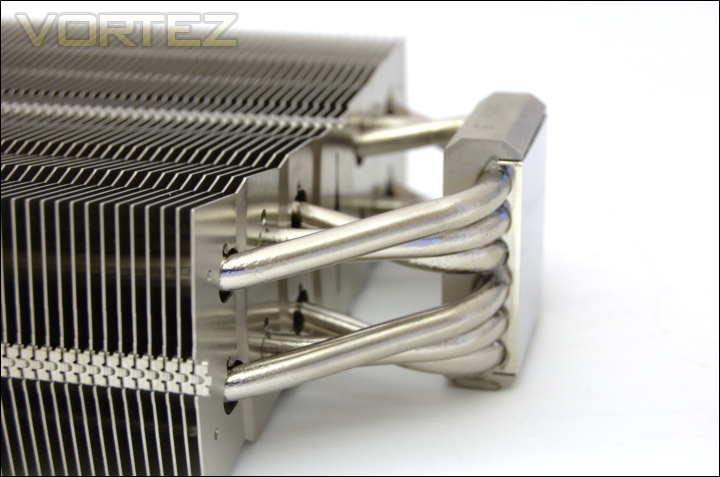
The 6 sintered heat pipes
The Archon takes the traditional approach and uses 6 sintered heat pipes all 6mm in diameter. They are soldered to a nickel plated copper base and use the same construction themselves for the best heat conductivity. They spread out from the base to form a linear pattern and spread the heat out more effectively across the fins.
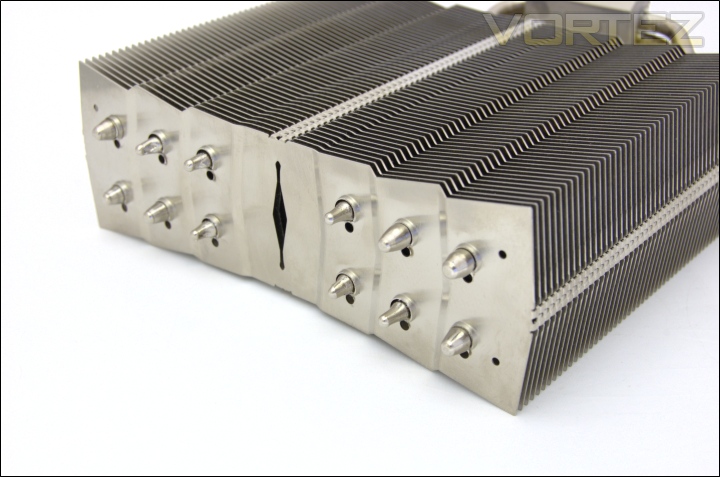
The top of the heat pipes
At the top, the ends of the heat pipes are visible, 6 being rounded ends and the other 6 grooved. The top has a matte finish unlike the Silver Arrow and the Prolimatech Super Mega. The two holes near each corner of the heatsinks are for the fan wire clips.
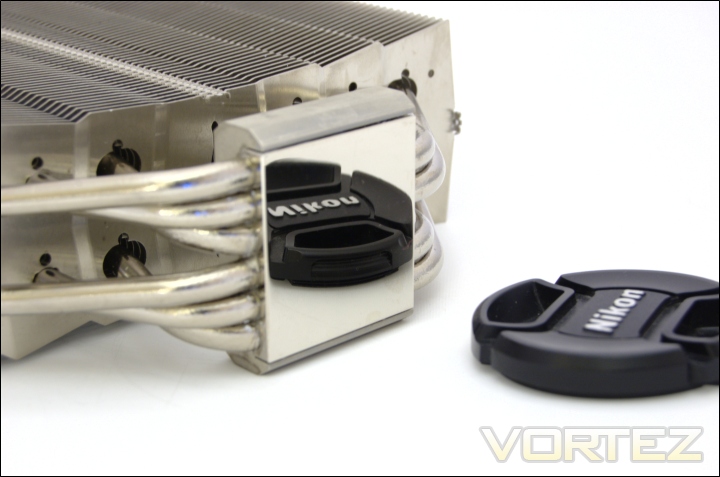
The reflective base
Like all Thermalright CPU heatsinks, the base is convex for maximum contact with CPU chips, which never tend to be flat either. It also has perfectly flat and reflective mirror finish so that no air gaps are present once installed. Ensuring maximum contact with the CPU means that heat can dissipate more efficiently through the base to the 6 heat pipes.
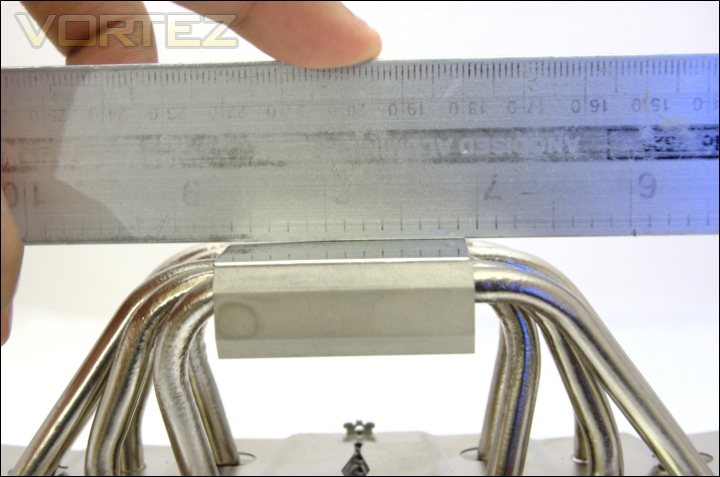
The flatness of the base
The slight curvature in the base can be seen here. The convex shape is meant to accommodate the shape of CPUs’ integrated heatspreaders but those with lapped CPUs won’t have any problems either as the curvature is only slightly. Thanks to the pressure mounting mechanism, the bases ensure that thermal paste is spread evenly across the whole CPU even with just a blob applied.
Closer Look (Continued)
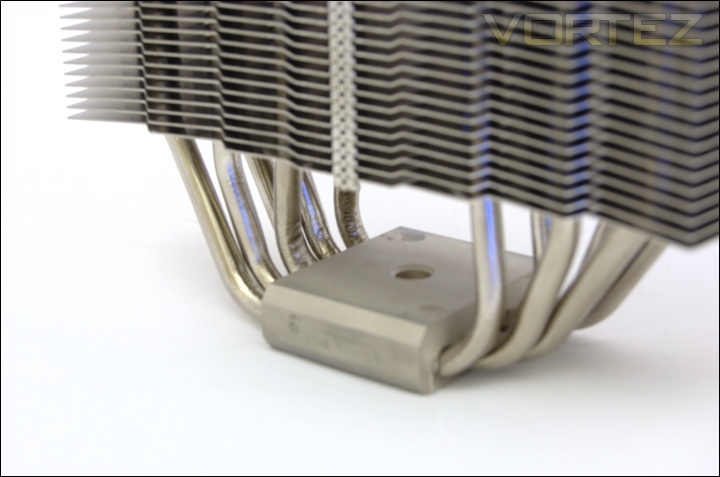
The base and heat pipes
The base of the heatsink uses an aluminium block with copper underlying to. The copper is in direct contact with the CPU and heat pipes for more efficient heat transfer. The hole is where the pressure vault mounting bracket is inserted when installing the heatsink.
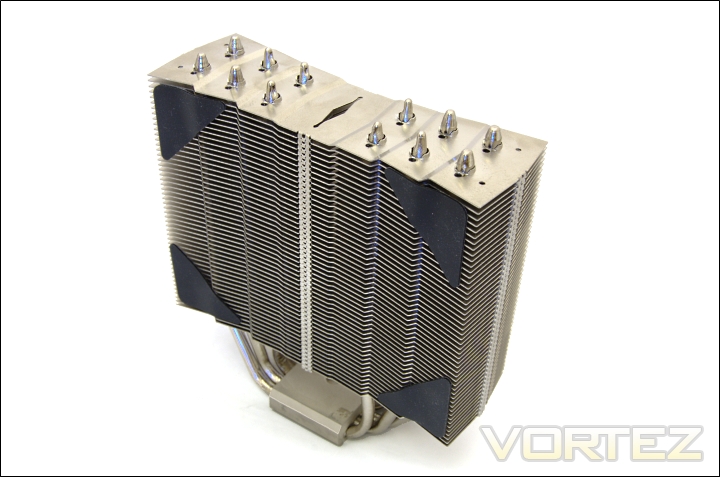
Anti vibration pads
The Archon bundles triangular rubber anti-vibration pads than can be stuck to the corner of the heatsink to prevent the fan from making direct contact with the aluminium fins and thus reduce vibrations. Enough are provided for two fans to be installed. Four anti vibration strips are also provided which line up with edge of the heatsink. The latter is more ideal as it doesn’t hinder airflow but it is more of a nuisance to stick. For testing purposes, I removed the triangular pads to maximise airflow. In reality, airflow from the rotating blades would focus in the middle and hence be unaffected by pads so the precaution was only taken for good measure. During the tests, I noticed no vibrations whatsoever.
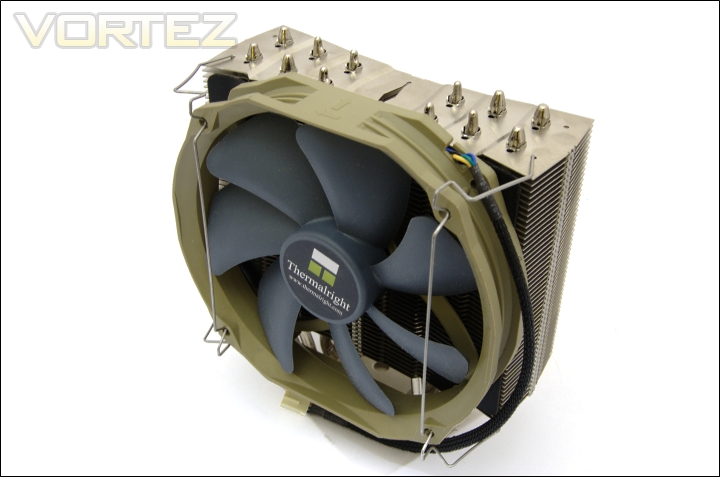
1 fan installed
The Archon is bundled with a single fan which even when installed doesn’t detract the cooler from being one of the narrowest we have tested. The provided wire clips simply insert into the holes at the top and bottom of the heatsink and clip into the notches on the fan. The wire clips are physically flexible to make installation easier and allow both 120mm and 140mm fans to be supported. The Thermalright TY-140s use 120mm fan mounting holes in this case despite the 140mm diameter. Ideally, the Archon should be used with 140mm fans due to the vast frontal area benefitting most from fans that can blow air across all the fins. 120mm fans have the disadvantage of not being able to cover all the fins so heat cannot be dissipated as effectively.
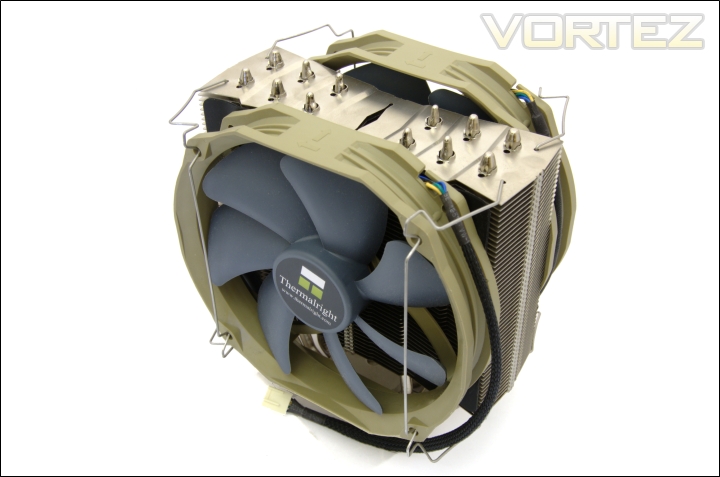
2 fans installed
The Archon comes with 4 wire clips so two fans can be installed for a push-pull configuration. Unfortunately, this has to be bought separately. The ability to mount 140mm fans is an advantage the Archon has over the Venomous X.
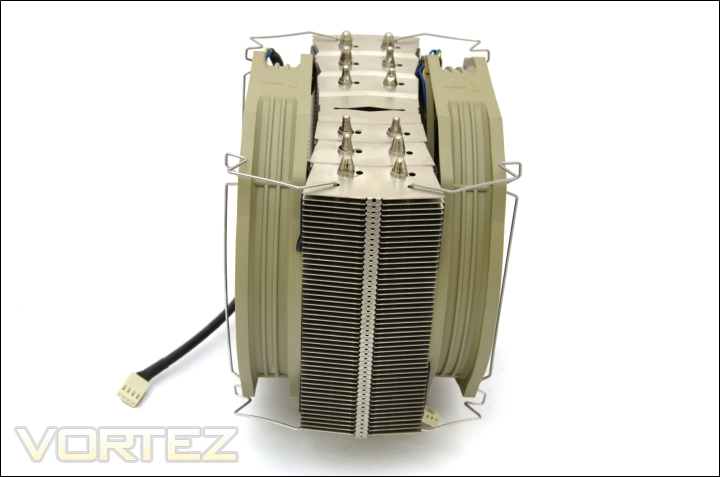
Side view of the cooler with 2 fans
With both fans installed, the cooler is 100mm wide, still narrower than most coolers on the market.
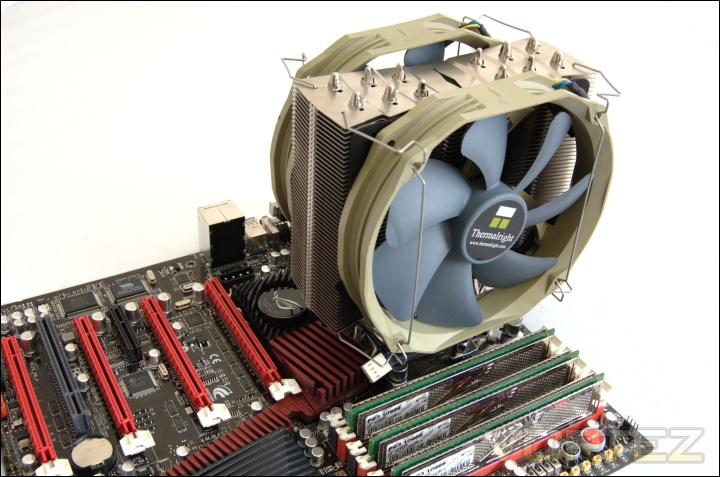
Archon installed on motherboard
Once installed on the motherboard, the towering height of the cooler at 170.25mm overlooks all the other components. The broader length of the cooler may cause it to come into conflict with tall motherboard chipset heatsinks or even motherboard expansion slots so check the compatibility page and cooler dimensions before purchasing.
Question: Archon’s height seems a little different than other tower heatsinks, is there anything I should pay attention to when installing Archon inside a case?
Answer: Archon is 170mm in height, so please make sure you have a case that is more than 190mm in thickness, and there should be no side-panel fan, if there is, it must be removed before installing Archon.
Answer: Archon is 170mm in height, so please make sure you have a case that is more than 190mm in thickness, and there should be no side-panel fan, if there is, it must be removed before installing Archon.
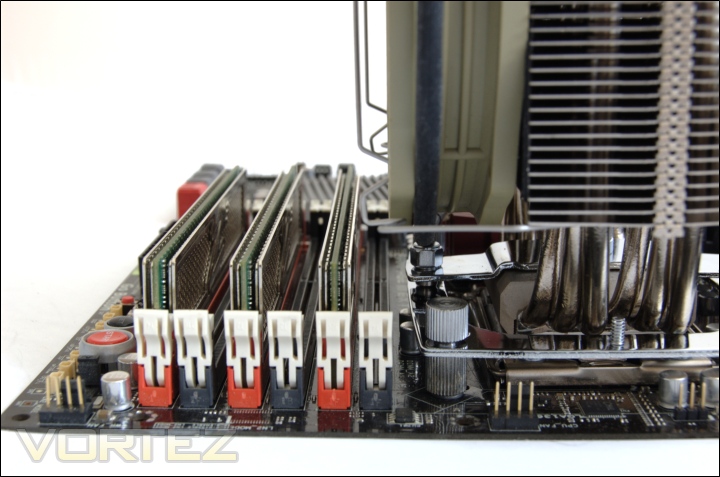
Memory clearance
Memory compatibility is the Archon’s key purpose. From the picture, it can be seen that the front fan doesn’t overhang the nearest DIMM slot on this X58 motherboard so all the slots can be populated. The problem is that the fan wire clips protrude further than the fan and ends up above the adjacent memory slot meaning tall memory modules will have conflicts. This is only a problem if all slots are populated but it is still a thoughtless oversight by Thermalright. This is also a problem we found with the HR-02. To fix this, Thermalright simply have to produce wire clips that notch into the inner fan mounting holes which would furthermore allow compatibility with 38mm fans. Memory clearance might be better on P67/P55 boards where the memory slots are further away from the CPU socket. The support tab on Thermalright’s page illustrates this better.
Comparison Shots
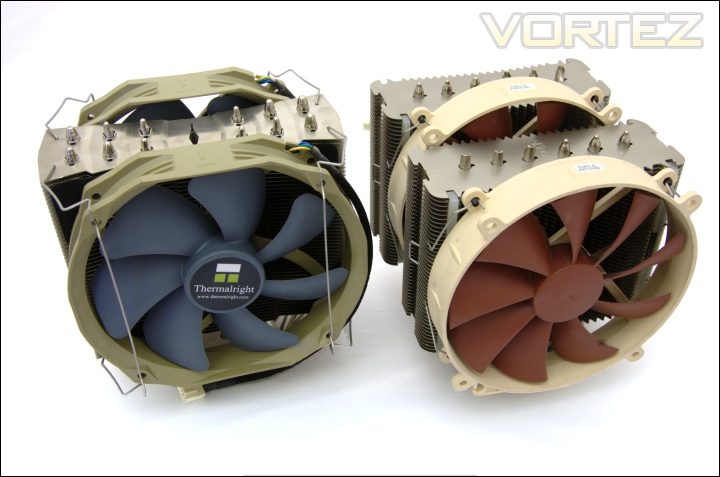
Thermalright Archon VS Noctua NH-D14
Next to the almighty Noctua NH-D14, the narrow width of the Archon becomes immediately clear but at the same time, the breadth of the latter is unmatched.
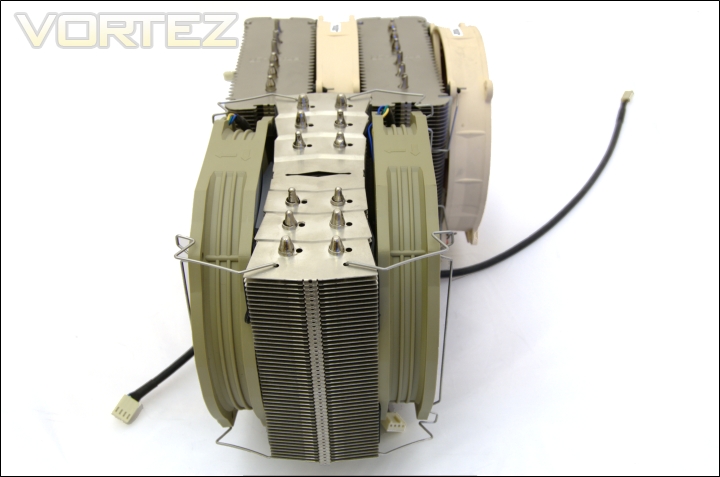
Thermalright Archon VS Noctua NH-D14 side view
Side by side, the Archon is 48mm narrower than the Noctua with both fans installed. It’s unsettling to think that the width of the Archon heatsink alone is only a mere 5mm greater than one of the NH-D14’s radiator. So the Thermalright have a tough challenge on their hands.
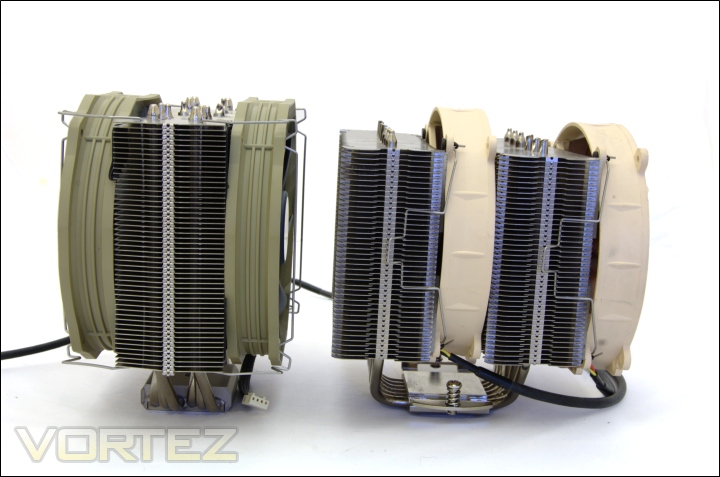
Thermalright Archon VS Noctua NH-D14 width
To compensate for the narrow width, the Archon towers over the NH-D14 but will this be enough for it to take the performance crown?
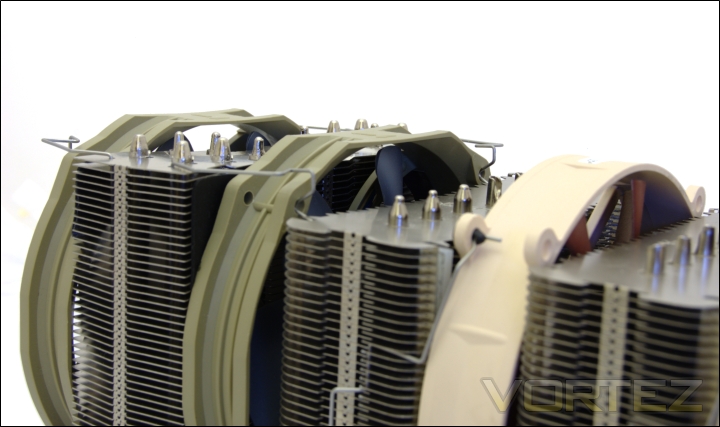
Thermalright Archon VS Noctua NH-D14 height
With a height of 170mm, the Archon is 10mm taller than the Noctua NH-D14. Although the fan makes both coolers appear to be the same height, the positioning of the Noctua fans can be adjusted at the users’ will.
Test Setup
CPU – Intel Core i7 920 – 2.66/4.0GHz
RAM – 6GB (3x2GB) OCZ Platinum DDR3 1333MHz
Motherboard – ASUS Rampage III Extreme
Graphics card – XFX HD5870 1024MB
Power Supply – Enermax Revolution 85+ 850W
Hard Drive – OCZ Vertex 2E 120GB
Samsung F1 320GB
Samsung F3 1TB
Drivers – ATI Catalyst 10.10
CPU Coolers:
Thermalright Archon including passive and tests using 2 Noctua NF-P12s/NF-P14s, 2 TR-TY 140s and 2 SWiF2-120Ps
Prolimatech Super Mega including passive and tests using 2 Noctua NF-P12s/NF-P14s, 2 SWiF2-120Ps and 2 Prolimatech Blue Vortex 14sNoctua NH-C14 (U.L.N.A and default speed) including tests using 2 SWiF2-120Ps
Thermalright Silver Arrow including passive and tests using 2 Noctua NF-P12s and 2 SWiF2-120Ps
Thermalright HR-02 including passive and tests using Noctua NF-12/NF-P14s and Thermalright TR TY-140
Thermaltake Frio (Low/med/high speed) including tests using 2 Noctua NF-P12s
Corsair H50 including tests using 2 Noctua NF-P12s and 2 SWiF2-120Ps
CoolIT ECO A.L.C including tests using 2 Noctua NF-P12s and 2 SWiF2-120Ps
Thermalright Venomous X using 2 Noctua NF-P12s and 2 SWiF2-120Ps
Coolink Corator DS including tests with dual fan setups
Tuniq Propeller 120(High speed fan)
Noctua NH-C12P SE14
Prolimatech Megahalem
Noctua NH-D14 (U.L.N.A and default speed)
Noctua NH-U12P SE1366
Thermolab Baram (with 2 Noctua NF-P12 fans)
CoolIT Domino A.L.C
Sunbeam Core Contact Freezer
Coolermaster Hyper 212 Plus including test with 2 Noctua NF-P12 fans
Alpenföhn Nordwand including test with 2 Noctua NF-P12 fans
Tuniq Tower 120 Extreme (Low/med/high speed)
Program Suite:
Core Temp 0.99.5
LinX stress Test
AIDA 64 Extreme Edition
CPUID HWMonitor
How I tested:
Testing will be based on temperatures recorded by Core Temp and PC wizard after 20 passes of LinX stress test. The absolute temperatures recorded in the tables are averages of the 4 cores and the delta value provided for a fair comparison, taking into account ambient temperatures. The test will be run at stock speed and at an overclocked speed of 4GHz.
Installation
Installing the Thermalright Archon is a very straight-forward process. The mounting mechanism is the universal one used across the entire range of Thermalright’s new coolers. The Archon supports both AMD and Intel sockets but here we will detail installation on an X58 system.
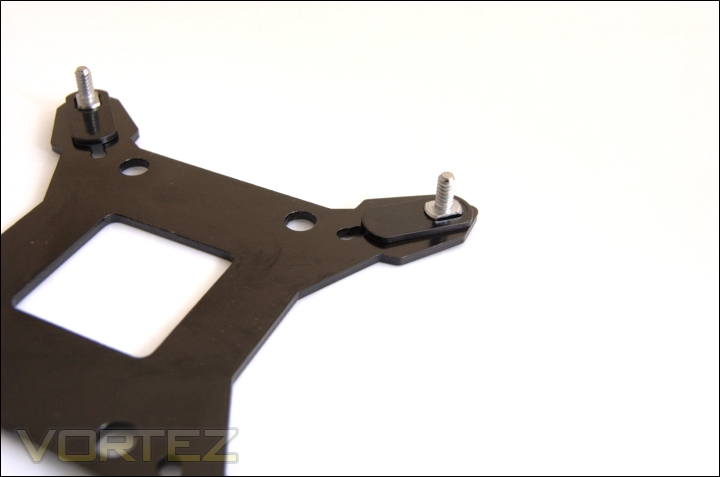
1. Adjust the screw pillar on the backplate for the desired Intel platform. The inner most notches are for socket 775. For socket 1155/1156 compatibility, move to the next notch, and the final outermost notches are for socket 1366 motherboards. Users on socket 775 motherboard need to install the additional 775 backplate in the centre.
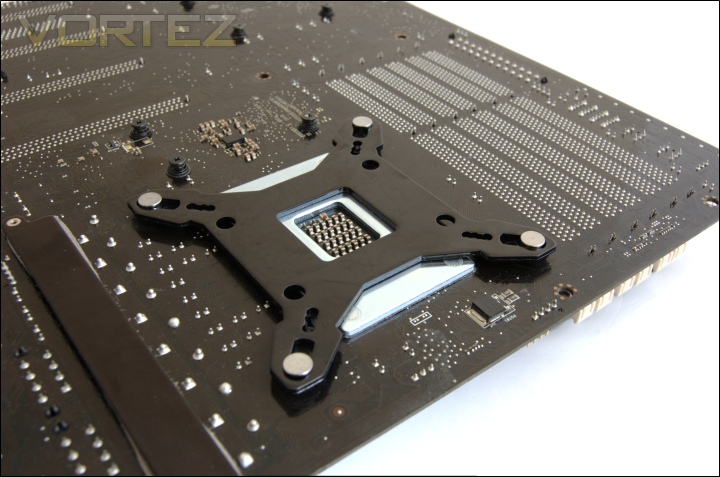
2. Install the backplate to the back of the motherboard making sure the screw pillars are lined up with the appropriate motherboard holes.
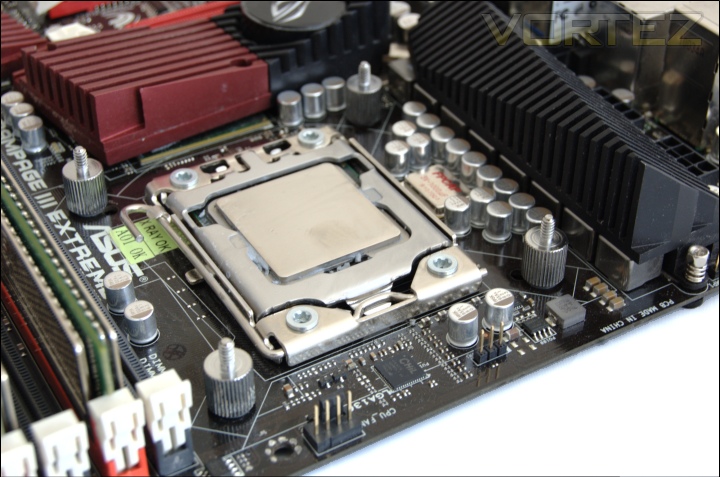
3. Install the screw pillars on the top side of the motherboard to secure the backplate.
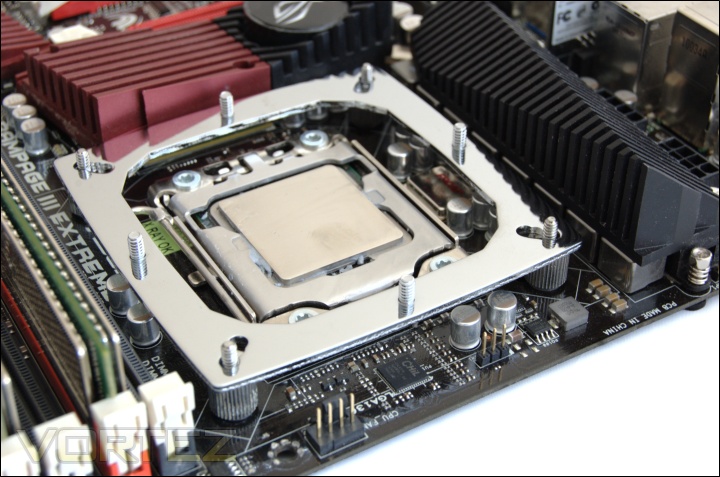
4. Place the anchoring mount on top.
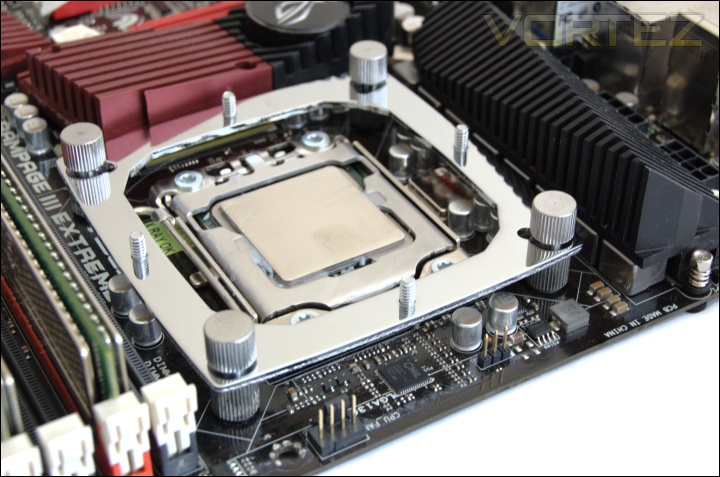
5. Use the thumbscrews to secure the anchor mount and tighten until it cannot be further turned by hand.
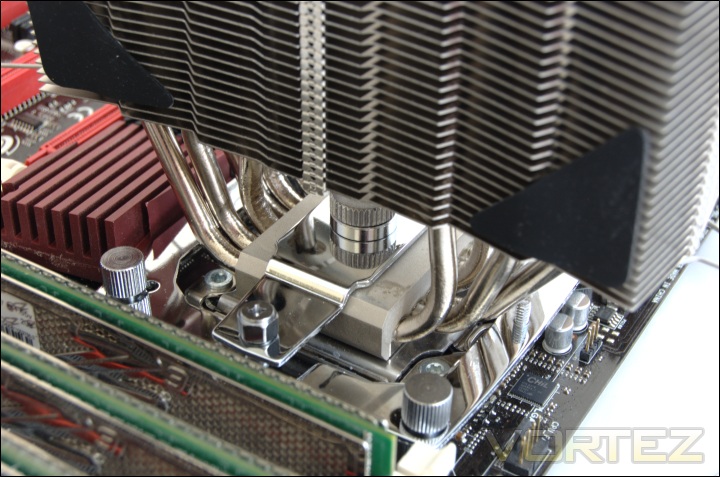
6. Put a blob of thermal paste on the CPU and place the heatsink on top. Slide the pressure vault bracket between the heat pipes making sure the centre nob is lined up with the hole on the heatsink base. Screw in both ends to the anchor plate.
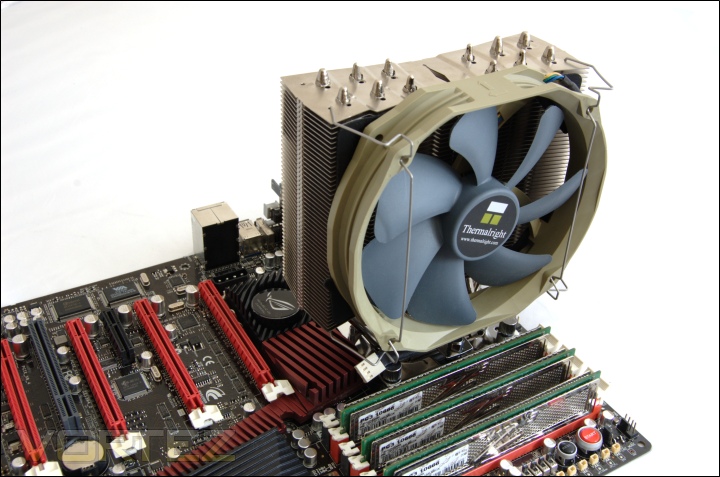
7. Apply anti vibration strips to each side of the heatsink and pull both ends of the fan clips and make it go through the holes on the corners of the heatsink. Install the fan and secure it with the wire clip notches.
The pressure vault mount in step 6 allows users to adjust the pressure using a bundled wrench between 40lbs and 70lbs. The maximum pressure is out of Intel’s recommended specifications and may thus damage CPU sockets. I recommend not turning the wrench fully clockwise (70lbs).
Results
The results have been arranged in terms of the fan configuration that yields the best results for each cooler. However, it is important to take into account that many coolers come with their own fans and changing those increases the costs significantly, so the “out of the box” cooler configurations have been highlighted in red each group.
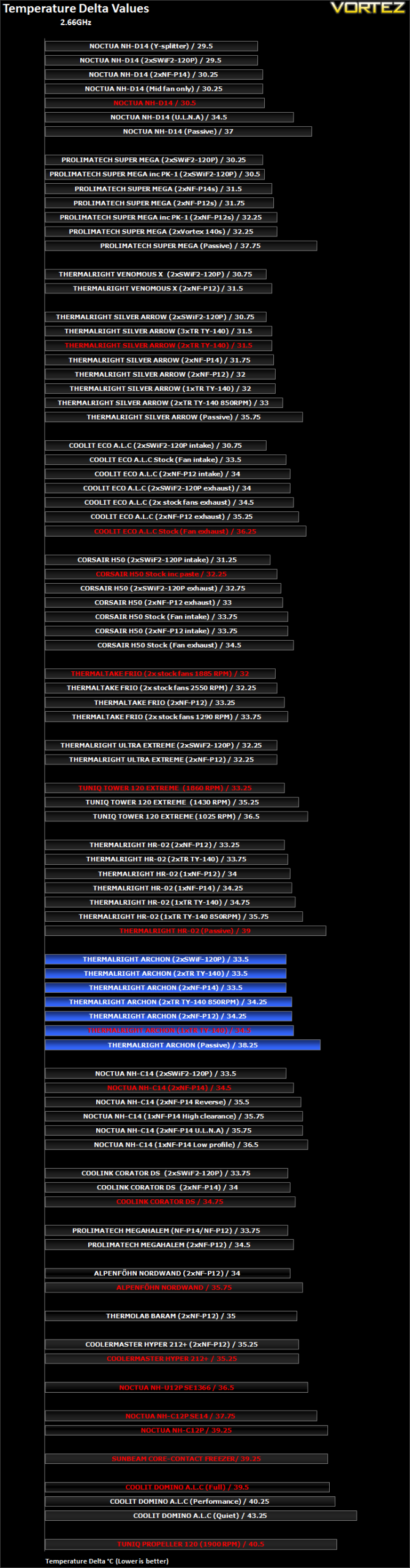
The Archon does not get off to the most promising start. In its default configuration with a single fan, it compares with the top down Noctua NH-C14, and the HR-02 sporting the same fan setup. It falls behind other popular mid-range coolers such as the Tuniq Tower 120 Extreme and the more recent Thermaltake Frio. Unfortunately, it cannot match the Venomous X which it was set to compete against. Even changing the fan setup didn’t yield a big enough difference to outcompete some of our top coolers. Adding a TR TY-140 fan reduced the delta temperature by 1C, once again making it comparable to the HR-02 and allowing it to outperform the default Corsair H50, Coolink Corator DS and Prolimatech Megahalem.
Looking at the performance between the NF-P14s and the TR TY-140s, we observe that the two generated the same results under load but the latter yielded slightly lower idle temperature deltas, hence its position above the Noctua fans. The sheer speed of the SWiF2-120Ps weren’t enough improve cooling potential demonstrating the Archon’s preferential effectiveness with 140mm fans as a result of its size.
Results (Continued)
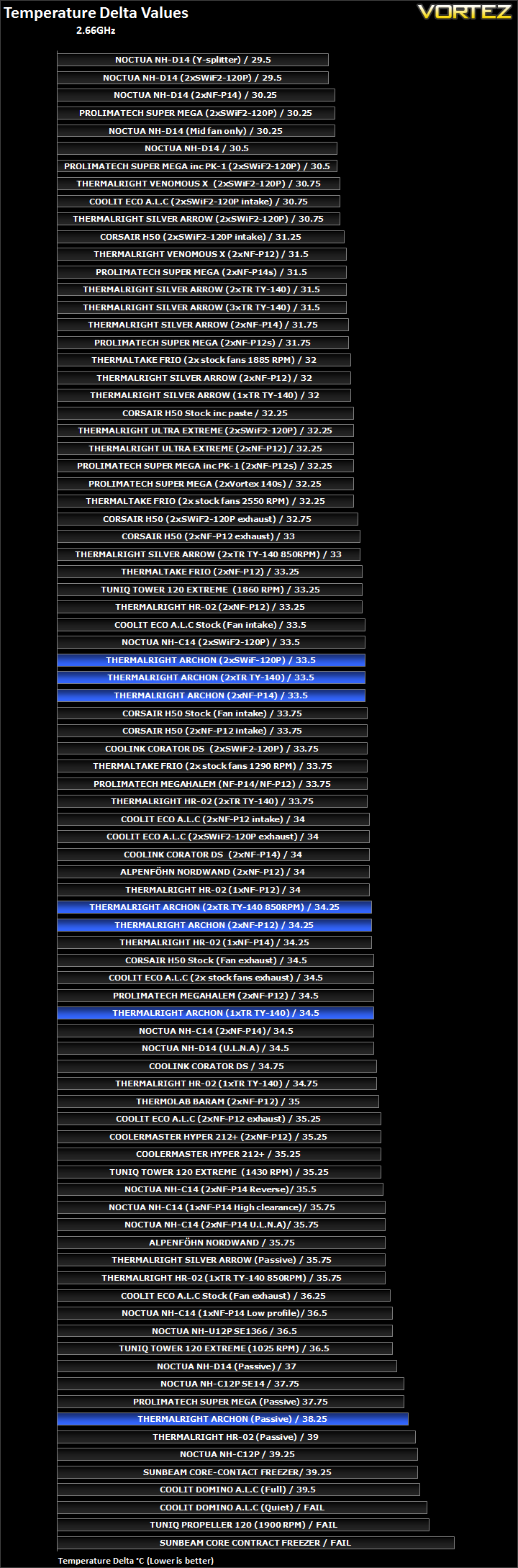
Results (Overclocked)
The results have been arranged in terms of the fan configuration that yields the best results for each cooler. However, it is important to take into account that many coolers come with their own fans and changing those increases the costs significantly, so the “out of the box” cooler configurations have been highlighted in red each group.
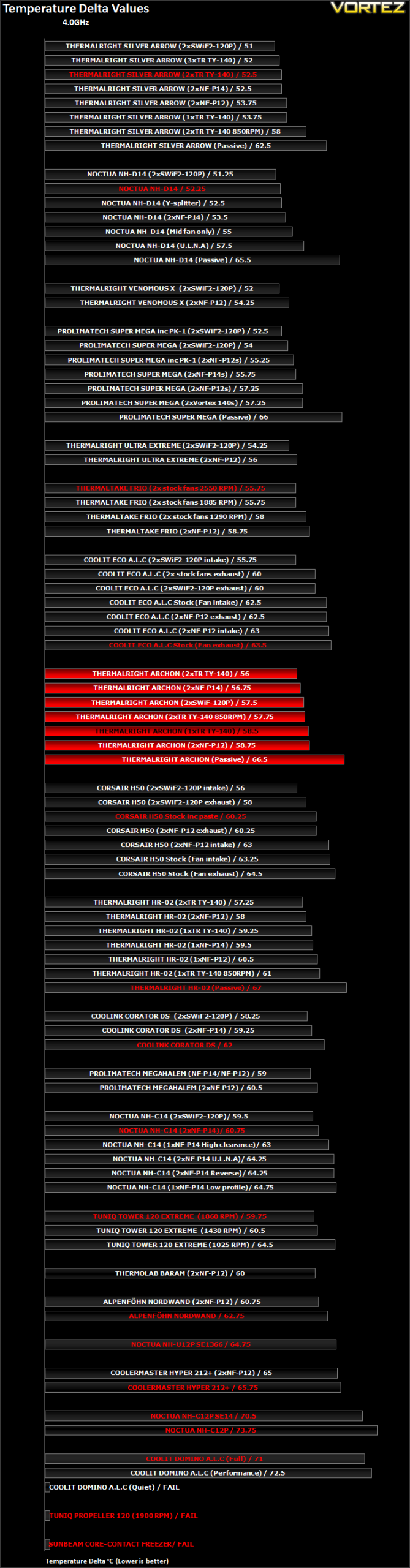
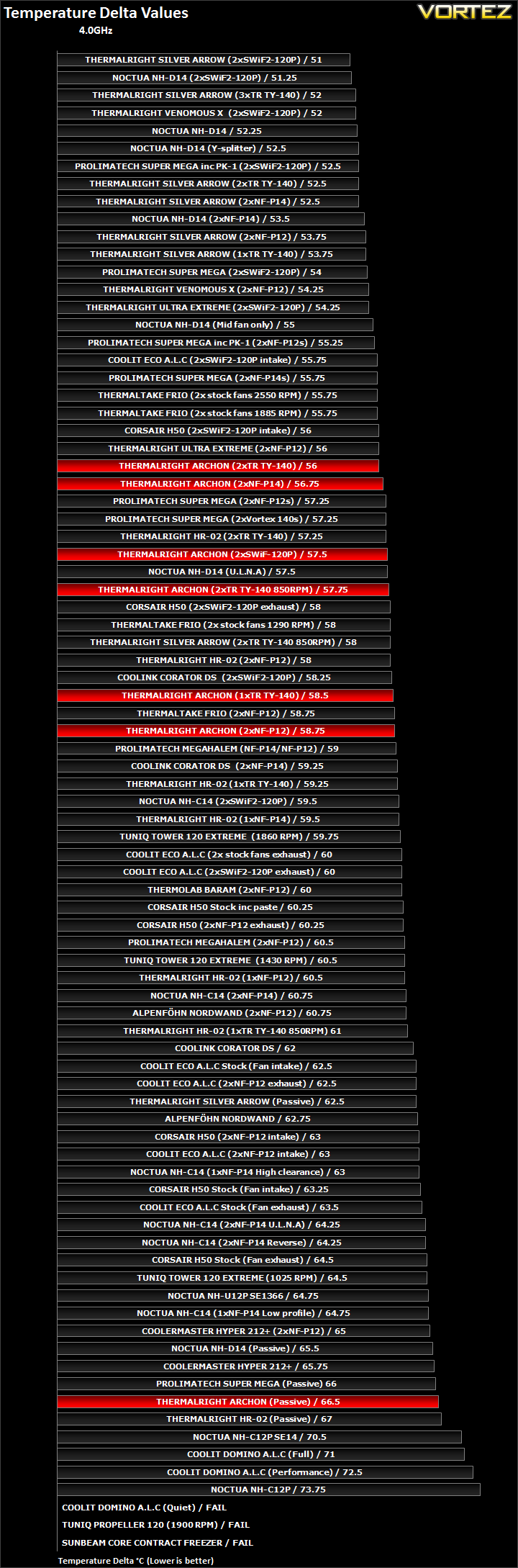
Performance with the overclocked i7 at 4GHz looks to be more favourable. In its default configuration, the Archon yielded a delta of 58.5C, allowing it to fall under the 60C barrier. The Archon easily outperforms the stock CoolIT ECO, Corsair H50, Prolimatech Megahalems and the Thermalright HR-02 sporting the same fan. It even matches the Thermaltake Frio with the latter equipped with two NF-P12s. The single 140mm fan setup means that the Archon remains quiet in its operation whilst delivering brilliant performance. Unfortunately it fails to match the Silver Arrow or Noctua NH-D14.
Since Thermalright compare the Archon with their own Venomous X, so I installed two NF-P12s to see how the two would compare. Unfortunately, the two 120mm failed to achieve the same results as the single TR TY-140 and as such failed to match the Ultra Extreme, yet alone Venomous X. The best performance was with 2 TR TY-140s, yielding a 56C delta temperature and allowing the cooler to match the Ultra Extreme. Given that the Thermalright fans are cheaper than the Noctua NF-P12s, it makes more sense simply adding another TR TY-140 to the Archon for more efficient cooling. Again however, the performance is not enough to match the Venomous X.
A peculiar observation, albeit not surprising, the 140mm fans tend to generate far better results on the Archon than the 120mm fans. If we look at the Silver Arrow, we see two SWiF2-120Ps outperforming two TY TR-140s and yet the opposite is true on the Archon. The slower and quieter spinning 140mm is welcomingly more efficient. This is because the latter can push air through more fins whereas the 120mm fan cannot cover the vast heatsink face as it would normally do with “shorter” coolers. It also explains why the 2 NF-P12s on the HR-02 outperform the same fan combination on the Archon when the opposite is the case with 140mm fans installed instead. We can conclude that the Archon benefits more greatly from larger fans than higher RPM 120mm ones. Given that 2 TR TY-140 running at 850RPM were keeping up with 2 SWiF2-120Ps, it shows that the Archon is ideal as a quiet cooling solution. In fact, this particular fan configuration outperformed the Silver Arrow using the same 2 TR TY-140s at 850RPM, and came close to matching the Noctua with U.L.N.A by a mere 0.25C. Unfortunately, running the fans at their default maximum speed demonstrates that the Archon heatsink is not as efficient as the Silver Arrow for sheer cooling performance.
Other than the dual tower solutions, the only other cooler to be compatible with 140mm fans is the Prolimatech Super Mega. The Archon was only a mere 1C behind it using the same 140mm NF-P14 fan configuration suggesting that if both used TR TY-140 fans, there would be a similar performance difference. If we then take into account the cost of the Archon with 1 additional fan and the Super Mega with two fans bought separately, the Archon represents much better value for money.
Results (Overclocked Continued)
Other Observations
Thermal Paste
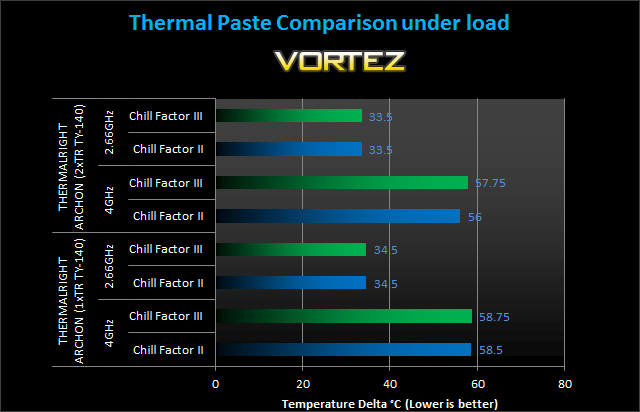
Most avid readers will probably know by now that all the tests conducted use the same Thermalright ChillFactor II thermal paste regardless of what the coolers come bundled with. However, it is still important to see whether bundled solutions are better or worse than the standard ChillFactor II. The Archon comes with a small 2g tube of ChillFactor III thermal paste and from previous tests, we found the latter to be superior. In this case however, the bundled ChillFactor III strangely generated worse results and retesting confirmed the results. The difference was more prominent at 4GHz with a delta difference of 1.75C. The application was evenly spread out when I removed the heatsink for inspection so the reason for this behaviour remains unknown.
Passive Tests
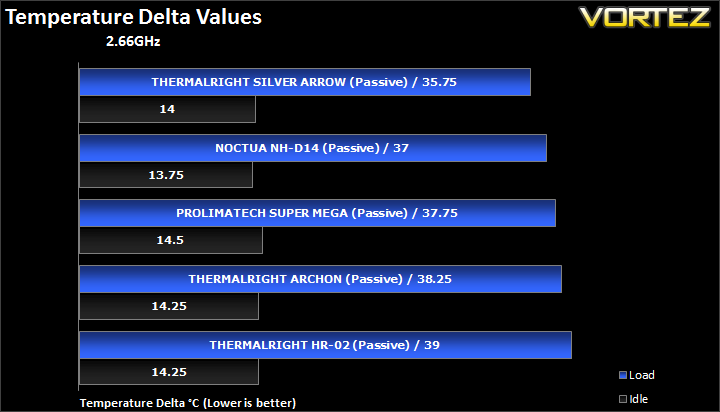
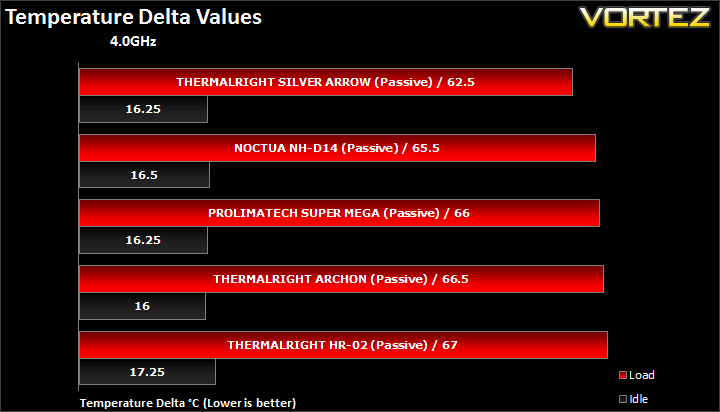
The Thermalright Archon has proven to be ideal for quiet operation. Taking it one step further, it copes well even as a passive cooler, outperforming even the HR-02 which was purposefully designed for passive operation. It fell short of the Super Mega and no match for its own brother, the Silver Arrow.
Conclusion
On first impressions, I was left a little underwhelmed by the Archon given the hype surrounding the cooler and Thermalright’s claim that it can outperform the legendary Venomous X. Certainly, its performance both at stock and overclocked speeds lagged behind our top coolers and other Thermalright offerings bar the HR-02. With its single fan, its performance fell short of the Thermaltake Frio but outperformed the original Prolimatech Megahalem so in all it wasn’t a bad performer.
But after analysing the results more closely, the Archon offers more than meets the eye. Testing with different fans demonstrated that 140mm are for more effective on the cooler than 120mm ones, even the high RPM SWiF2-120Ps. Looking at other coolers, the latter fan tends to generate the best results and yet the Archon favoured the slower spinning larger fans. There is no doubt that the reason is due to the vast area of the fin array benefitting most from a fan that can push air through more fins at once. The implication is that the Archon is a brilliant cooler for quiet operation. Although its sheer performance cannot match that of the Venomous X, the Archon has the flexibility of supporting larger fans. While that isn’t enough to match the Venomous X, it ensures much quieter operation. Adding a second TR TY-140 and turning both down to operate at 850RPM provides a good balance between performance and noise and most importantly, it matches the Silver Arrow using the same fans at the same speeds and the Noctua NH-D14 with U.L.N.A. It’s hard to discern whether this was Thermalright’s intent but this is the conclusion I can draw from the Archon’s performance.

Overall, the Archon can be described as a very unique cooler. It might not generate the same raw performance figures as the Silver Arrow, Venomous X or Noctua NH-D14 but it demonstrates that is more than capable as a quiet but effective cooler. At £44, it is priced against the likes of the Thermaltake Frio and the inclusion of the TY TR-140 fan is more than welcomed. I would highly advise getting an additional fan as this shouldn’t break the bank given the price of the Thermalright fan. The Archon is also appealing as a cooler that doesn’t obstruct memory slots although we observed that the fan clip may get in the way of the slot closest to the CPU. This minor niggle is something Thermalright need to fix to claim full compatibility with tall memory modules populating all the slots.
Pros
+ Good performance
+ Quiet
+ Very easy to install
+ Attractive finish
+ Bundled fan
+ Support for 120 & 140mm fans
+ Out of the box AMD and Intel support
Cons
– Possible compatibility issue with tall memory modules if all slots are populated on X58 motherboards
– Performance falls behind the Venomous X
– Heatsink may be too tall for some cases
+ Good performance
+ Quiet
+ Very easy to install
+ Attractive finish
+ Bundled fan
+ Support for 120 & 140mm fans
+ Out of the box AMD and Intel support
Cons
– Possible compatibility issue with tall memory modules if all slots are populated on X58 motherboards
– Performance falls behind the Venomous X
– Heatsink may be too tall for some cases
The Thermalright Archon deserve a respectable Vortez Silver Award.

